 PulseGTO
Getting started
Recalculating a node
Recalculate Node re-solves one postflop spot of a blueprint on your computer with RangeCFR. It uses the same betting tree and the ranges with which the blueprint reaches the node, and it solves every hand combination separately.
When to use it
- You want a per-combo strategy on a specific board rather than the blueprint's abstraction-based one.
- The node shows a "!" badge: several hand classes share one postflop strategy there.
- You want a new per-combo strategy and EV for this postflop spot.
Steps
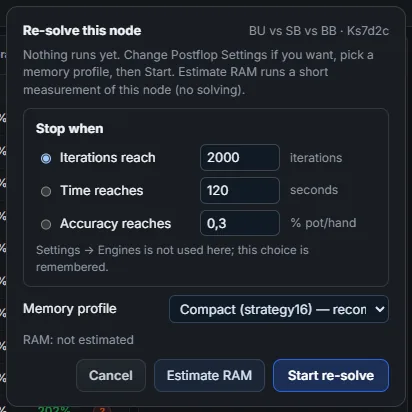
- Go to a postflop node of a loaded blueprint and click Recalculate Node. Nothing runs yet.
- Pick a stop rule: iterations, time in seconds, or accuracy in % of the pot.
- Pick a memory profile: Compact (strategy16) (recommended), Full precision (fp32) or Most compact (compact16). Estimate RAM shows how much memory it needs. A profile that needs more than 90% of free RAM cannot start.
- Click Start re-solve. Progress and accuracy appear in the top bar; Stop keeps the current result.
- Click Save to keep the result in the
.pgbas an override. The trained blueprint strategy is not modified, and the Re-solved badge switches between the two.
The result is as good as its convergence: check the accuracy in the Acc pill before you save. A re-solve improves this one spot; the rest of the blueprint is unchanged.
Change Node runs the same re-solve, but first lets you edit the ranges and bet sizes.
Node locks
A node lock answers "what if this player plays this spot my way?". In Change Node you fix the strategy at the node being re-solved, and the rest of the tree is solved as the best play against it. Node locks are supported by heads-up RangeCFR; the three-way solver does not support them.
- Lock this node: sets one mix for the whole range, for example check 30%, bet 33% 70%. The sliders always add up to 100%. Dragging one action moves the others, and the padlock pins an action so later drags leave it alone.
- Per-hand locks: in the range grid of the player who acts, drag a hand class (for example AKs) to a mix of its own. Every combo of that class plays that mix, and hands you did not touch keep the strategy the solver finds. Per-hand locks apply to the acting player only; locks on the other player's hands are ignored, and a message says so.
- Scope: a lock applies to the first decision of this re-solve. To lock a later street, re-solve from that node with its own lock.
- Reading the result: at a locked node the average strategy converges to the lock. The EVs and the strategy elsewhere show the best response to it.
Locks set in the app treat suits alike, so the solver keeps its suit isomorphism. A lock that singles out individual combos of a class (for example AhKh but not AsKs) breaks that symmetry. The solver then computes every turn and river card separately, which takes longer and needs more memory: on a two-tone flop about 1.6× the RAM.
Three players from your own ranges
In the HU mode card in Postflop Settings, choose 3 · SB / BB / BTN to add a third range. SB acts first, BB in the middle and BTN last. Set the board, pot, stacks, rake and bet sizes in the three-way panel, then press Solve 3-way. Start from a flop, turn or river; browse each player's strategy and EV with the action buttons. A flop solve covers all possible turns and rivers by default when RAM allows. A reduced-turn quick preview is optional.
A three-way flop with wide ranges can need several GB of RAM and minutes per iteration. Starting this solve stops any three-way blueprint re-solve currently running, because both use the same local engine process.
Three-way nodes
When three players are in the hand, Recalculate runs the three-way engine:
- Turn and river roots are solved with every card dealt.
- On a flop root, the default is all turns and all rivers. The engine reduces turn coverage only if free RAM is short or you choose quick preview. See Sampling accuracy for the reduced-coverage case.
- A turn outside the sample keeps showing the blueprint, and a message tells you to recalculate from that turn.
The preflop engine trains complete blueprints for two to six players, so you can browse stored strategies at four-, five- and six-player postflop nodes. Separate, exact-hand postflop re-solves currently support heads-up and three-way nodes; nodes with four or more players use their blueprint strategy.
A three-way flop re-solve is a long job: tens of minutes to hours, depending on the ranges and the tree. Turns take minutes and rivers seconds. See Three-way postflop research for measured times.
The ranges that enter a re-solve are the blueprint's reach at the node. Hands below a cutoff share of the maximum reach are left out. The cutoff is set in Postflop Settings and defaults to 1%.
A saved override stays in the file. A second re-solve of a node below it starts from the ranges that the first re-solve produced.