 PulseGTO
Desktop Engine · Windows
Preflop solver: ranges for your own game, played to the river
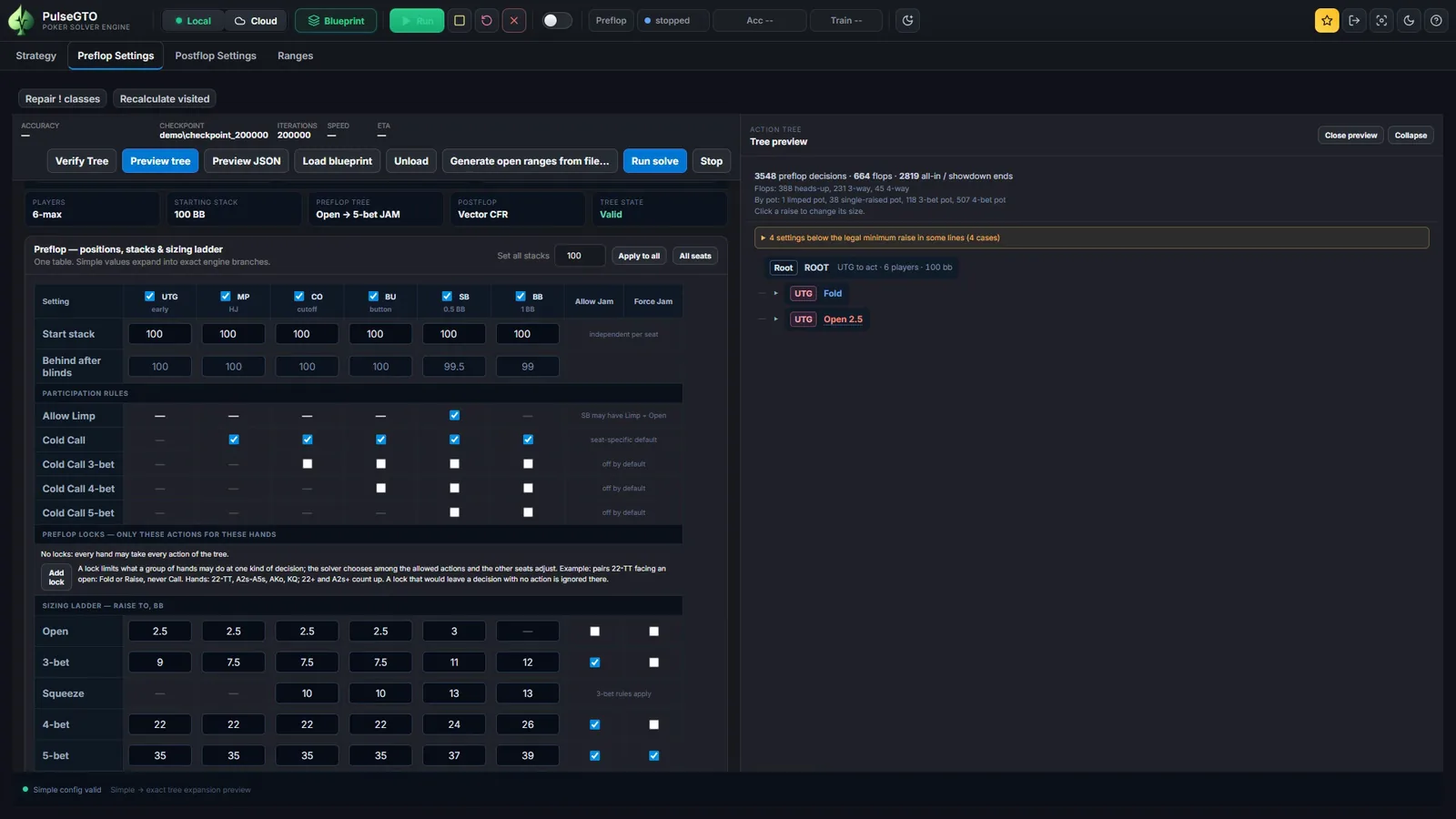
Set the players, a stack per seat, the rake and the open, 3-bet, squeeze and 4-bet sizes for every position. The Engine trains the whole game from the first preflop decision to the river on your own computer and saves it as one blueprint file: ranges for every seat, with the postflop strategy behind every line.
Describe the game you actually play
- Seats and stacks: two to six players, a stack per seat or one for all.
- Rake: percentage, cap in big blinds, minimum pot, no flop no drop. Rake is taken from the matched pot, as at real tables.
- Sizes per seat: open, 3-bet, squeeze, 4-bet and 5-bet, as a raise-to amount or a multiple; allow or force the jam at each level.
- Who may call: small-blind limps, cold calls of the open, and optionally cold calls of 3-bets, 4-bets and 5-bets per seat.
- The postflop part of the tree: bet sizes per pot type (limped, single-raised, 3-bet, 4-bet+), raises, jam, donk and probe bets.
See the tree before you spend the hours
Preview tree builds the preflop tree from your settings without starting a run. Follow any line to a fold, an all-in or the flop, and read how many decisions, flops and pot types it contains.
Where a size is below the legal minimum raise in some line, the preview lists it. Set writes the smallest size that is legal in every line of that cell; Set all fixes every listed cell at once.
The run panel shows a RAM estimate for the tree and the chosen abstraction level before you start, and Verify Tree checks the configuration.
Preflop locks: ranges built around how you play
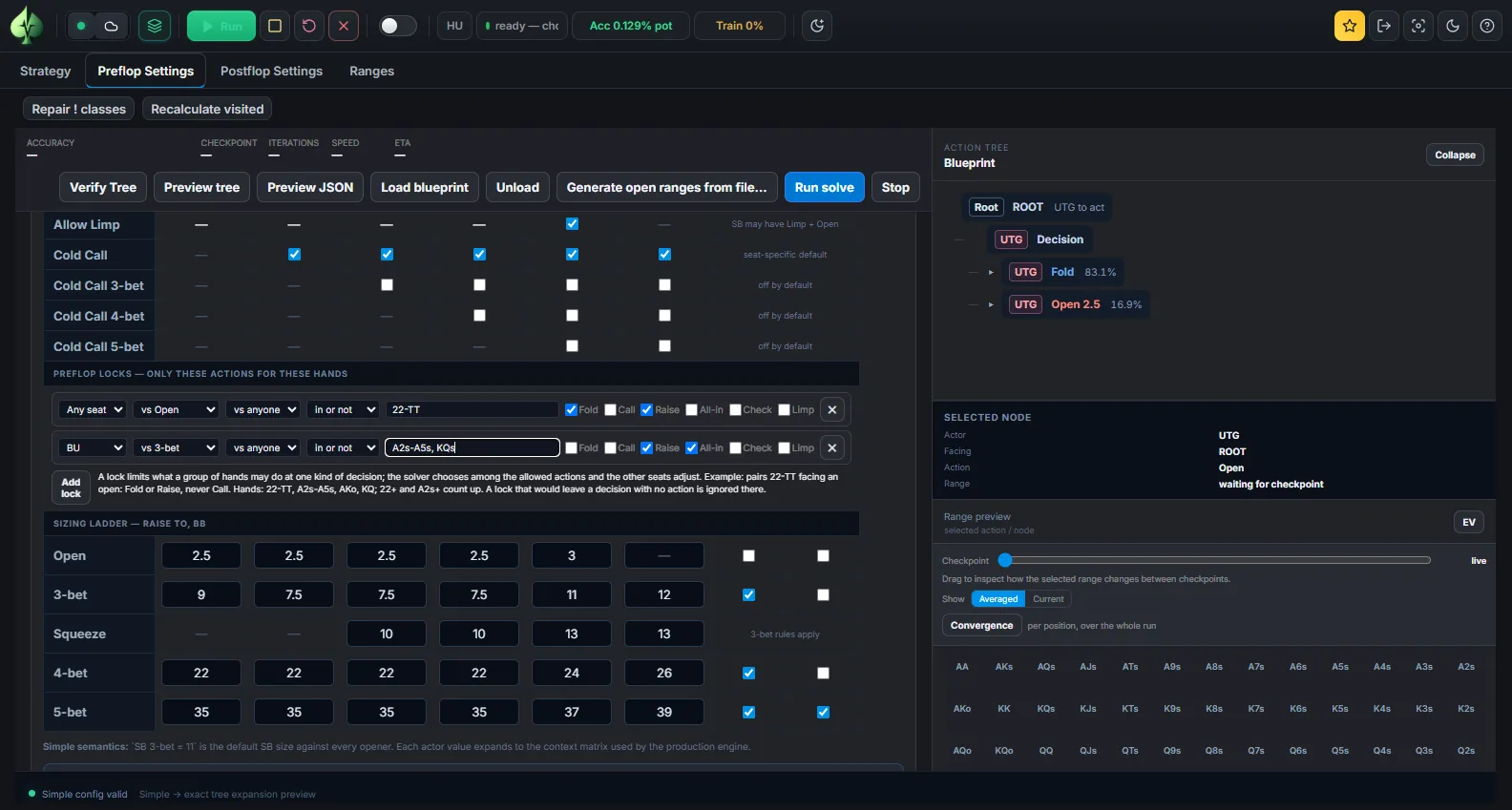
A lock lists the only actions a group of hands may take at one kind of decision. The solver chooses among the allowed actions, and every other seat adjusts to that.
- Pick the seat (or any seat), what it faces (first in, an open, a 3-bet, a 4-bet, a 5-bet, a limp), optionally whose raise, the hands (
22-TT,A2s+,AKo,KQ) and the allowed actions. - A lock removes actions; it does not fix a frequency. With Fold and Raise allowed, the solver still decides how often each pair 3-bets.
- Locked classes are marked on the strategy grid, and the locks are stored with the blueprint.
The result is a set of open, 3-bet and defence ranges that answer a player who, for example, never flat-calls with small pairs.
Browse the result from the first decision to the river
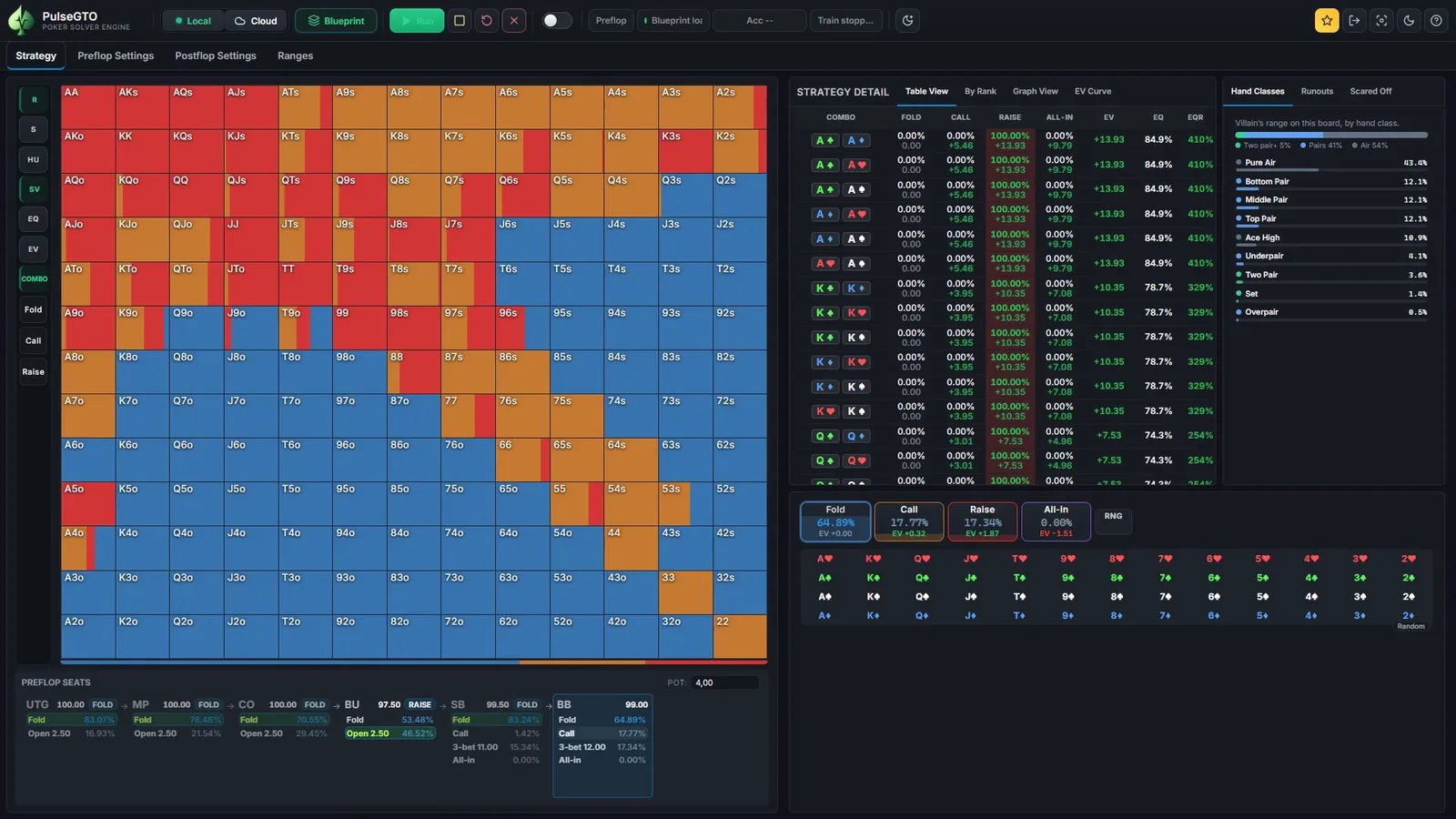
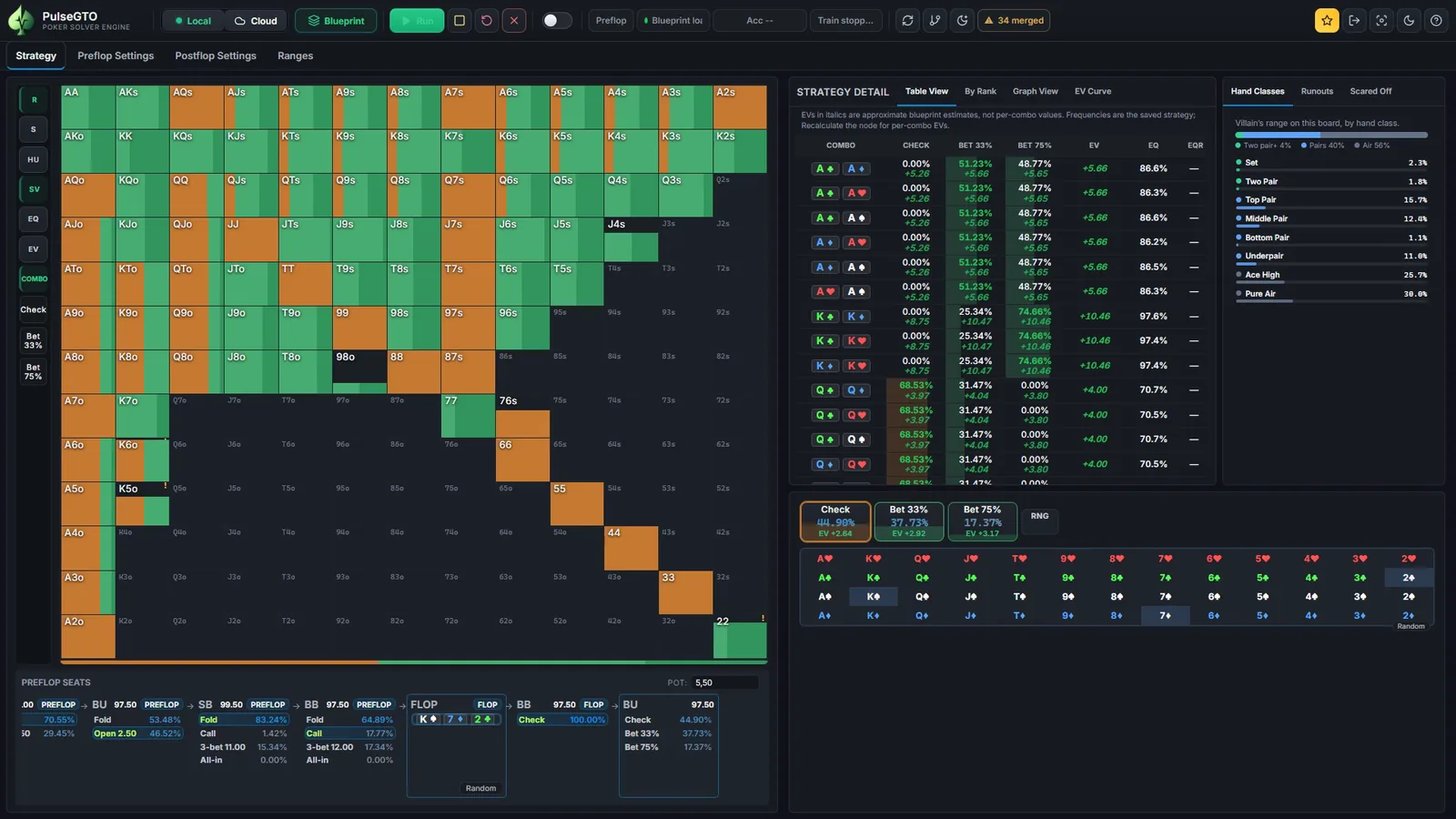
The blueprint holds, for every decision of the game, the probability of each action and the EVs recorded in training. In the Strategy tab you walk a line on the seat strip, pick the flop, turn and river, and read the range grid, the per-combo table and the hand-class breakdown at every node.
Postflop play in a blueprint is trained under a hand abstraction: similar hands share a strategy, which is what lets a whole six-handed game fit on a desktop. For one spot you can go further and re-solve it per combo; the result is saved into the same file.
Stop, resume, continue
- A run keeps going when you close the window or the app; the next start shows its progress and lets you stop it cleanly.
- Stop saves a checkpoint and a blueprint of the work so far. Runs keep the newest checkpoint and one spare.
- Load a checkpoint, tick Continue loaded checkpoint and set additional iterations to train further. The run keeps the checkpoint's own tree and abstraction.
- The run saves a checkpoint and stops itself at 85 % of physical RAM, so a tree that outgrows the machine does not take the machine down.
Checkpoints & long runs in the documentation.
What a full-size run costs
One measured run, so you can size your own: the 6-max 100 bb game above, abstraction level small, on a 12-thread laptop with 64 GB RAM.
- 200,000 samples in 12 h 29 min; the first 100,000 in 7 h 05 min.
- Peak RAM 20.9 GB; blueprint file 7.1 GB.
- Preflop accuracy bound 2.72 bb/100 at 200,000 samples (4.91 at 100,000). This is the engine's own bound inside the abstraction, not an independently measured exploitability.
Time, RAM, how the bound fell and what still moved between 100,000 and 200,000 samples: the 6-max 100 bb benchmark. Heads-up and 3-max trees run in a fraction of that.
Requirements
| OS | Windows 10/11 64-bit (the app opens in its own window; Microsoft Edge WebView2 is part of Windows) |
|---|---|
| CPU | 4 cores with AVX2; the engine scales with threads, 8+ cores recommended |
| RAM | 16 GB for heads-up and 3-max trees or a lighter abstraction; 32–64 GB for full 6-max trees |
| Disk | 2 GB for the app; at least 50 GB free on the drive where runs are stored |
Limits, stated plainly
- Blueprint postflop play uses hand abstraction; it is a starting point for a spot, not an exact solve of every board. Hand abstraction.
- The accuracy figure is a convergence bound for the preflop decisions inside the abstraction. Accuracy & limitations.
- Ranges are the answer to one tree: these sizes, these calls, this rake. Change the tree and the ranges change.
- Two to six players, chip EV in big blinds, no ICM model. Windows only.
Already in the file
- Opening ranges, every 3-bet, squeeze, 4-bet and all-in line of your tree.
- The postflop strategy behind every line, browsable street by street.
- The game settings, so the app shows what a file contains before you load it.
- Room for exact re-solves: your own strategy database.
Try the Engine free for 7 days
The trial is the full desktop Engine on your own computer. Nothing is solved on our servers.
- Create a free account on pulsegto.com and confirm your e-mail address.
- Open your dashboard and start the trial: it gives you a one-use activation code (valid for 15 minutes).
- Install the app and enter the code on the computer you want to use. The trial runs for 7 days from activation on that computer; activating and validating the licence need an internet connection.
After the trial, the Engine is a one-time licence for two Windows PCs with 12 months of updates included; current availability and prices are on the pricing page. The trial is offered while the trial campaign is open.