 PulseGTO
Feature guide
Node locking: ask a different strategy question
An unrestricted solve asks how the players respond within the chosen game. A lock changes one player’s available actions or strategy. The response is conditional on that assumption, not a new universal chart.
Two locks that do different jobs
| Preflop rule | Heads-up postflop lock | |
|---|---|---|
| Sets | Allowed actions for matching hands and decisions | A fixed action mix at the root of a re-solve |
| Example | 22–TT facing an open may Fold or Raise, not Call | Check 30%, bet 70% at this node |
| Still learned | Frequencies among allowed actions | Unlocked hands and later decisions |
| Scope | Rules in the blueprint’s game tree | Heads-up RangeCFR; not three-way locks |
Do not interpret “Fold or Raise” as “raise every pair”. The solver chooses a mix among the legal actions. Likewise, fixing a postflop strategy does not establish that your opponent actually plays it.
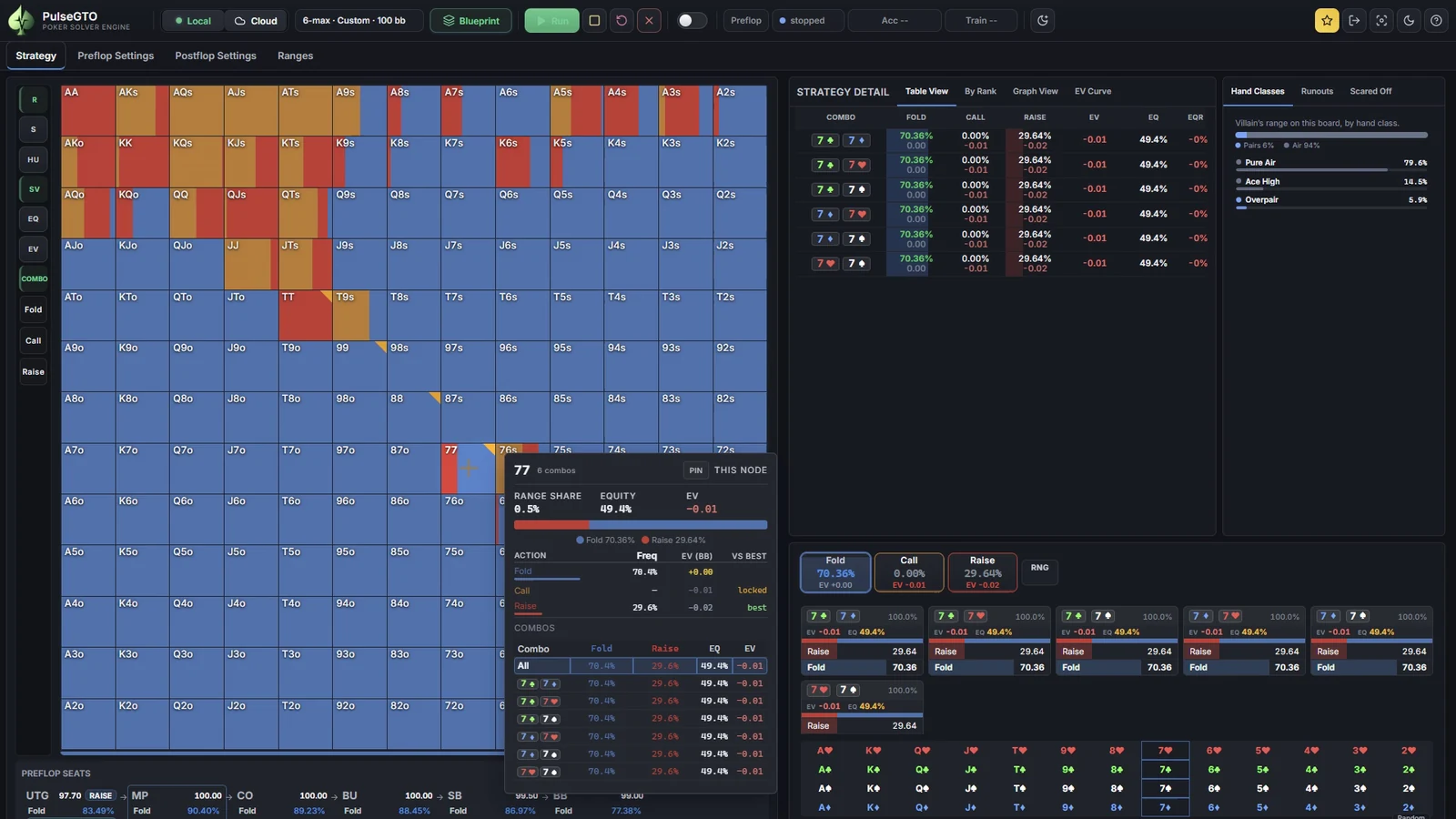
Example: remove pair flats facing an open
- Open the preflop lock rows in Preflop Settings.
- Choose the seat, facing an open, and the hand range
22-TT. Use the optional opener filter if the rule should apply against only one seat. - Allow Fold and Raise. Check whether All-in should be allowed separately; sized raises and jams are distinct actions.
- Preview the tree and start a new run with these rules.
- Compare with an unrestricted control on the same tree, rake and sample budget.
Matching rules intersect. A rule leaving no legal action is ignored at that decision and reported in the training log. Inspect the lock indicators on the Strategy grid. The rules are stored with the blueprint and checkpoint; continuing requires the same game identity.
Example: fix a heads-up postflop mix
Navigate to the relevant node and choose Change Node. Lock the acting player’s root mix, or specify mixes for selected hand classes. A per-hand class mix applies to every combo of that class; untouched hands remain free. Locks on a non-acting player’s hands are ignored with a message.
To study a turn tendency, begin the re-solve at that turn decision. The UI lock applies to the first decision of that re-solve, not arbitrarily to every later node. Let the continuation converge and compare it with an unlocked solve using the same starting ranges.
These are scenario assumptions. A small sample of observed bets is not enough to know an opponent’s exact mix; study several plausible assumptions before making a practical adjustment.
Read the result without rewarding an unavailable action
A locked hand may have an unrestricted action with a higher reported EV. That does not make the chosen locked action a training mistake: the action may have been deliberately excluded. In the updated hand detail view, the label “locked” distinguishes the constraint, and “best” is selected among allowed actions. If your installed build predates that UI update, inspect the rule itself.
Evaluate the response against the model you supplied, record the tree and ranges, and keep a control. Changing both the lock and the sizing at once makes it difficult to attribute the result. A successful exploit against an assumed strategy is not evidence that the unmodified game’s equilibrium has changed.
See the recorded workflow
Watch the preflop-lock demonstration on YouTube. The recording uses a 3,000-sample demo run; it illustrates the controls, not a reference equilibrium. The screenshot gallery shows the lock rows and the locked-hand result without requiring video playback.
Try the workflow on your own computer
Start a seven-day Engine trial from your account while the trial campaign is available. Activation and licence validation require internet access. Windows and an AVX2-capable CPU are required. Availability and licence terms are on the pricing page.