 PulseGTO
All screenshots on this page are one player's own GGPoker Rush & Cash NL5 hands from June 2023 on: 9,295 hands, +9.17 bb/100. The hand histories are read inside the app and are not uploaded anywhere.
1. Your result next to the solver's
Pick a game (room, format and stakes) and a period, then click Grade my preflop. The My play view shows three numbers, in dollars or big blinds, split by position and by pot type:
- You won: your real result, rake and fees already taken.
- Like the solver: the same hands, but from your first decision the solver would not make, the hand counts at the EV of the solver's own play.
- Difference: the difference between the displayed result and estimate; not a guaranteed measure of profit caused by a deviation.
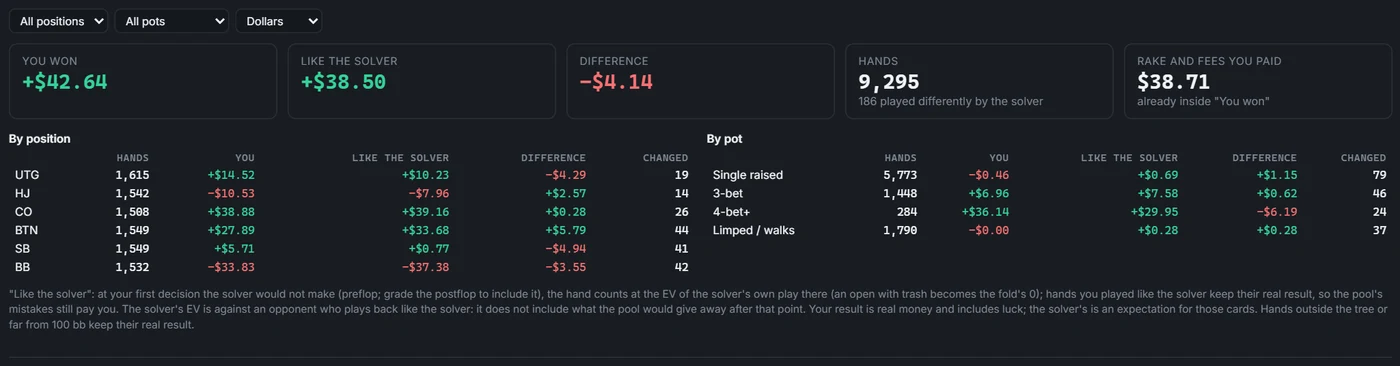
Here the real result is higher than the solver's. That is not a contradiction: your result is real money and includes luck and the pool's mistakes, while the solver's number is an expectation for the same cards against an opponent who plays back like the solver.
2. Where the EV goes
Every preflop decision is compared with the loaded blueprint: how often the blueprint plays your action with your cards, and the EV you lost — the EV of the blueprint's own mix minus the EV of your action. A play the solver makes at least 25 % of the time, or that costs under 0.05 bb, counts as a solver play; above that come inaccuracy (under 0.5 bb), mistake (under 2 bb) and blunder.
Where the EV goes ranks your spots by the EV they cost. Biggest mistakes lists the hands themselves; a click opens the hand. In this sample, 5,441 preflop decisions were graded: 96.5 % solver plays and 1.50 bb/100 lost, with the big blind against a 4-bet and against an open as the two costliest spots.
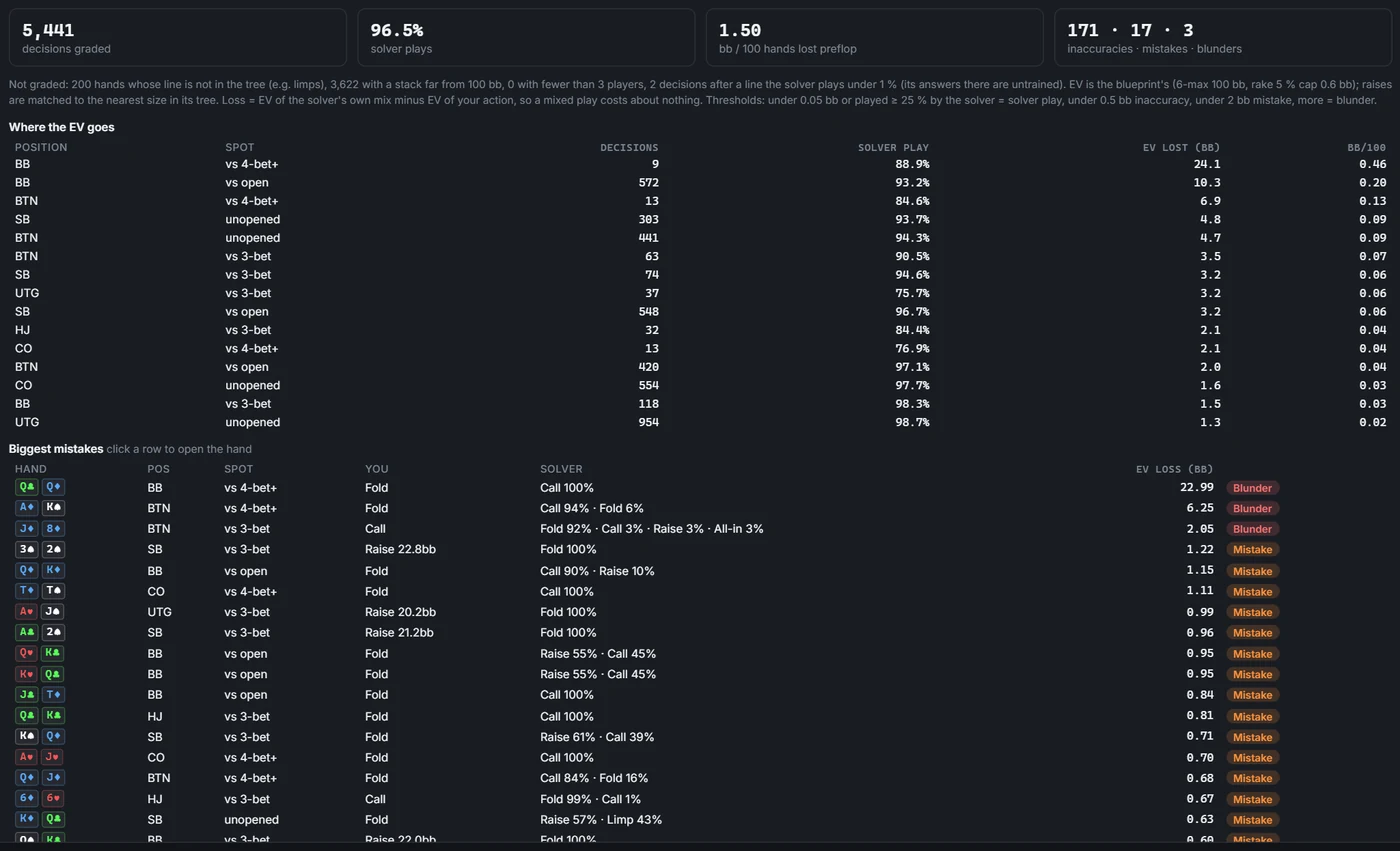
The panel also says what it did not grade and why: a line the tree does not have (for example a limp it never allows), or a stack far from the blueprint's depth. With a blueprint that has postflop strategies loaded, Grade my postflop does the same after the flop.
3. One hand, re-solved on your PC
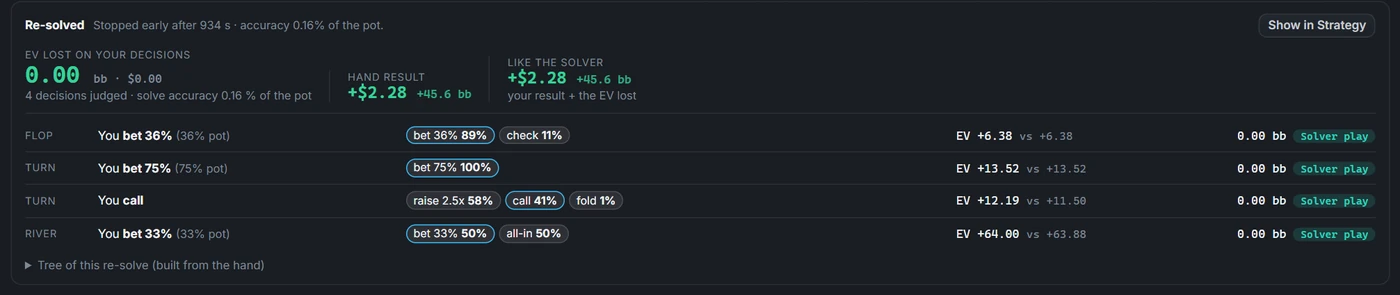
Open any heads-up hand that saw a flop. Quick check reads the loaded blueprint at each of your flop, turn and river decisions, instantly. Exact re-solve solves that flop on your PC: the pot and stacks from the hand, the ranges from the blueprint, and a tree built from the bet and raise sizes actually used in the hand. Every decision of yours is then judged on that solve:
- the solver's mix with your exact cards;
- the EV of your action against the EV of the solver's mix;
- the EV you lost, and a grade.
For the whole hand you get the result, the same result with the lost EV given back, and the decision that cost the most.
4. Your game
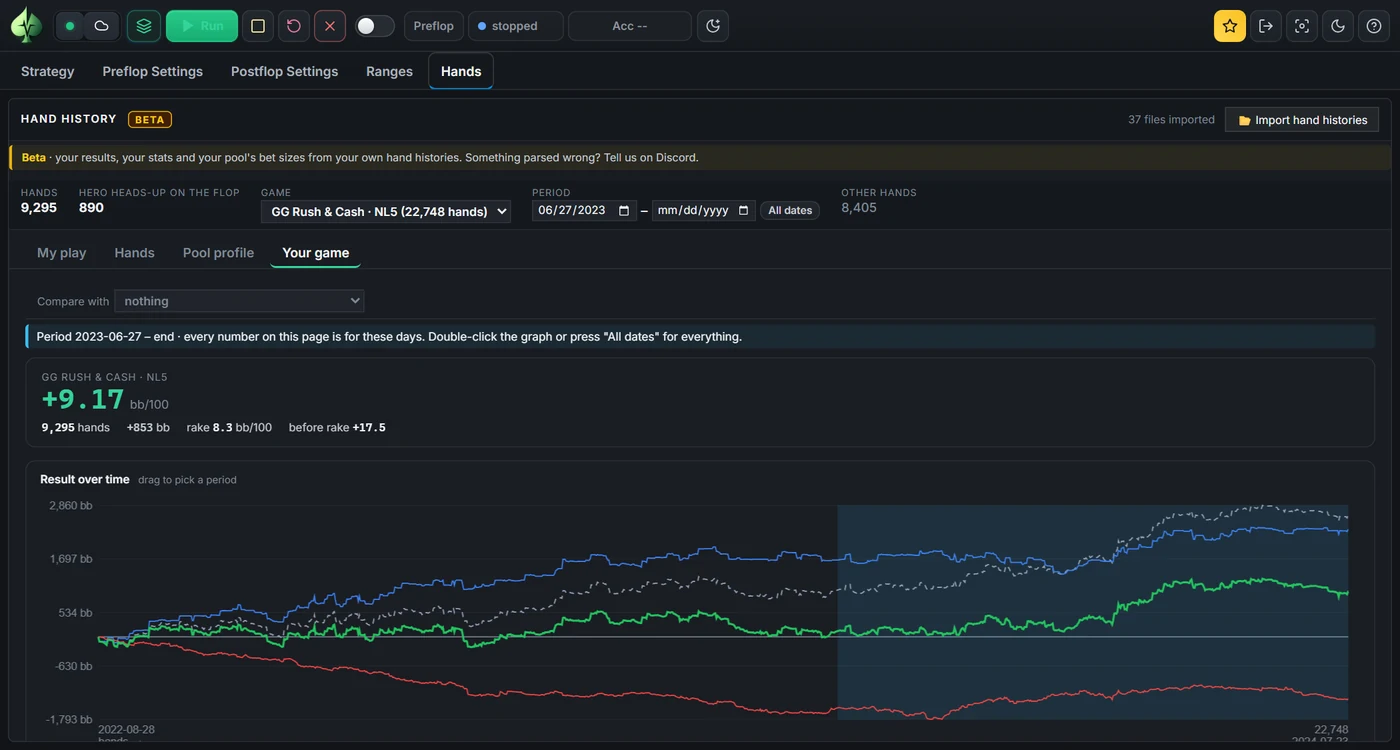
Your own numbers, from the hand histories only:
- winrate in bb/100 with its 95 % range;
- rake per 100 hands and the result before rake;
- a result graph over time: total, before rake, at showdown and without showdown. Drag across it to pick a period, and every view on the page follows.
Below it come the usual stats, results by position and stack, and a spot explorer for c-bets, barrels and check-raises, split by your hand, the bet size and the board.
What it is not
- "Like the solver" is an estimate. It is not what a solver would have won in those exact hands: the cards and runouts stay yours.
- Grading uses the blueprint's game. Decisions are graded on the blueprint's stack depth, rake and sizes, so grade with a blueprint of the stakes and rake you play.
- A re-solve uses the blueprint's ranges. It judges one spot with those ranges. If your opponent's range was different, edit the ranges and re-solve.
- Desktop app only. The Hands tab is in the Windows app; the online strategy library does not read hand histories.
The full guide, with every option: Hand histories in the docs.